But do something with it
Reader, we have been around the block a few times now, considering our knowledge management system. We need somewhere to put the information that comes over out path. We have seen that we forget what we don’t actively use, and we need a system to address it. We have seen that the information that we will work with have attributes and relationships that make the use of databases critical, we have also seen that the magnitude of the endeavour is worth pursuing. Even if the outcome is personal improvement.
These milestones that we have crossed over the passed month, surely, must have been crossed by some others. Others that may not be in the field we’re in, but struggling with the information overwhelm we are. I found a few that have shared they’re journeys and epiphanies, and some that have provided robust integrations of new and wonderful applications to make what we endeavour in this newsletter clearer, possible, easy?
Classify Information
The main urgency that I have had in trying to get the information situated, has always been the classification of information. From a Mechanical Engineering standpoint the classification will look like what I suggested in The MechEng Framework. From a Project Management standpoint the classification will look different, and then from a Database perspective it will look completely different further. The trick here, is the marriage of these classifications: staying true to the physical world in the MechEng Framework, becoming practical with the Project Management workflow, but utilising Databases for systems efficiency.
Enter: Thiago Forte. He wrote a book, and then another one. The first is called “Building a Second Brain”. and the second is a spin-off of a classification method he uses called “The PARA-method”. It’s huge. It’s a game-changer in its simplicity. It’s catchy.
Pause.
Enter: Thomas J. Frank. This man has been on the productivity scene since I was studying, and has recently taken a nose-dive into the world of Notion. Notion has dashboards, Notion has Databases, Notion has Thomas Frank to make it accessible. Notion is free.
Enter: David Allen. The guy who wrote Getting Things Done. He says “decide what you will do with the information”. He also says that things that take more than one task to be complete, is a project. (Plan a birthday party: Project.)
Play.
The method suggested by Thiago Forte for classification is based on the GTD method for project management. And Thomas Frank has captured these brilliantly in a Notion setup, and graciously shared it on his YouTube channel - for absolutely free.
Project Managing Information
The highest form of use that we can have for information is in the Project context. We have Tasks: they’re information. Tasks may draw from a library to be completed. Tasks may be set out according to Methodology. Projects may have a singular goal, or may be in pursuit of Milestones, Deliverables. Within a context that requires sustaining over time. This is all very intuitive.
Now, PARA.
P - Projects. A place for tasks. Even also a place for Notes.
A - Areas. A context to be sustained over time. A place for notes, a dashboard for viewing related Projects and Resources.
R - Resources. Useful, the things we forget. The library we refer to when looking for information, specific to context, drawn when a project calls for it.
A - Archive. Not trash. But not actionable anymore.
Many people have considered the first three as descending levels of actionability. Projects have active tasks and next steps. It’s what keeps you moving the needle forward. Areas have active projects, it’s a bird’s eye view of your priorities, business goals, application. Resources will be drawn from, and Archive is the chasm into which all unusable information may fall.
Databases from Project Management
Thomas Frank builds the databases required for the implementation of the PARA-method in Notion on YouTube. It confused me, then it didn’t.
Follow the diagram, to get the idea of how I want to implement this solution in my specific case.
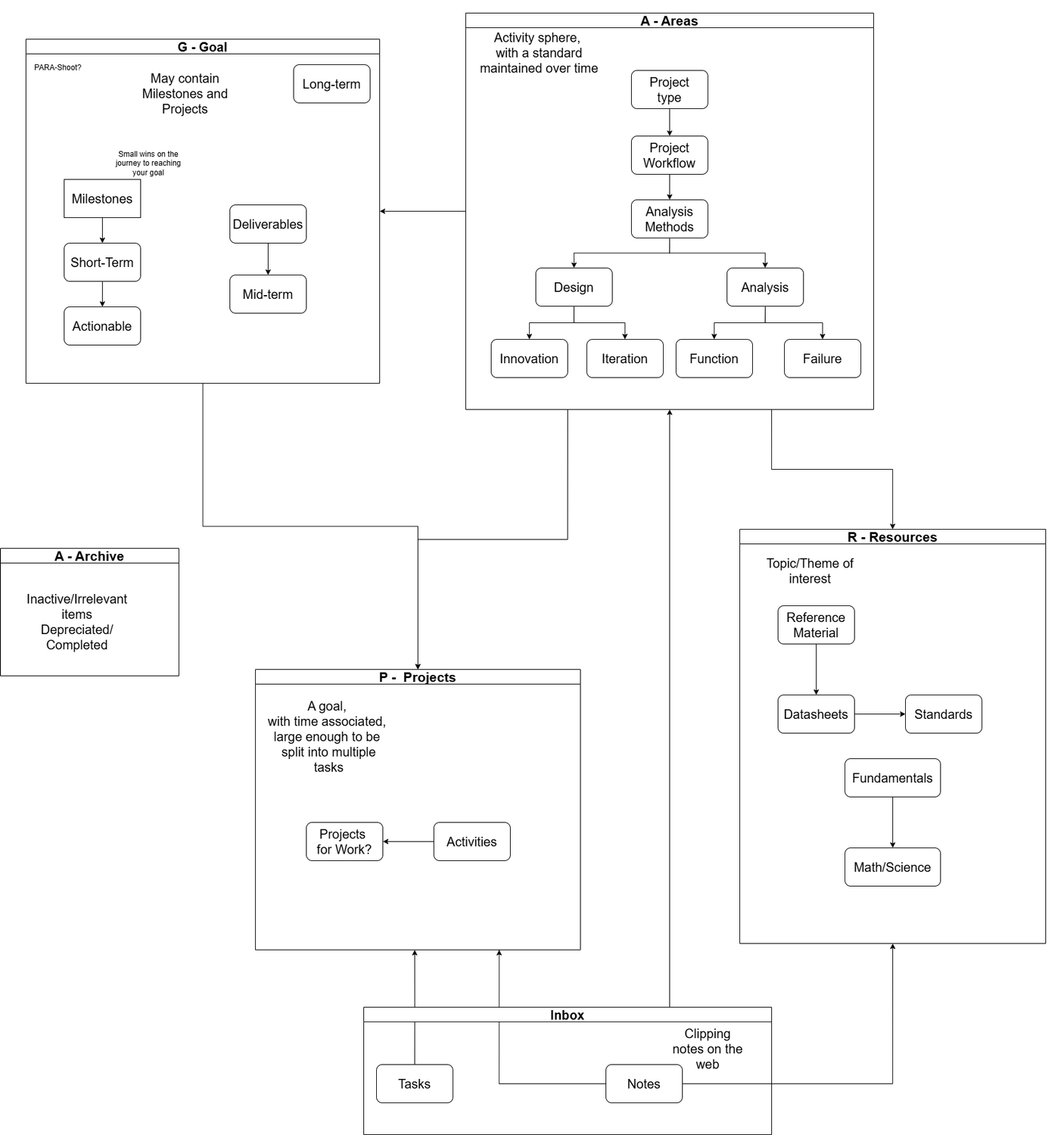
The GTD inbox contains Tasks and Notes. These can be delivered into the PAR allocations as the inbox is processed. In PKM-jargon, this is the “fleeting notes” catch all.
In the context of a Mechanical Engineer applying their minds in industry, a project may be very directly: some request from a client, with actions associated, providing deliverables to meet a goal. In the business context, the type of project might fall within the Areas classification. You want to maintain a business focus of design of innovative projects, so that you will be known as a designing mechanical engineering firm. Or you want to maintain a business focus of root cause of failure analyses, so that people know to contact you to complete those for them.
Then, Resources are where you keep the information you draw from to complete the project:
Standards and industry compliance live here.
Catalogues live here.
Analysis methods from MechEng fundamentals live here: explicitly, the MechEng Framework lives in Resources.
Datasheets live here.
Thermodynamic Tables live here.
Notion for Databases
I have decided on the use of Notion for the development of my knowledge management system. Notion is robust, Notion has databases. Notion is easy to manipulate. Notion has the possibility of building dashboards. The other KMS’s that I have looked into are often notes based, often flat. One note, some links. But no structure for the note. That is overwheling, in the application of the notes in project context. So Databases makes it possible to safely structure information, and Dashboards make it possible to contextualise information.
The Database structure suggested by Thomas Frank is shown in the following diagram. Drawing this made it very clear to me what was actually happening.
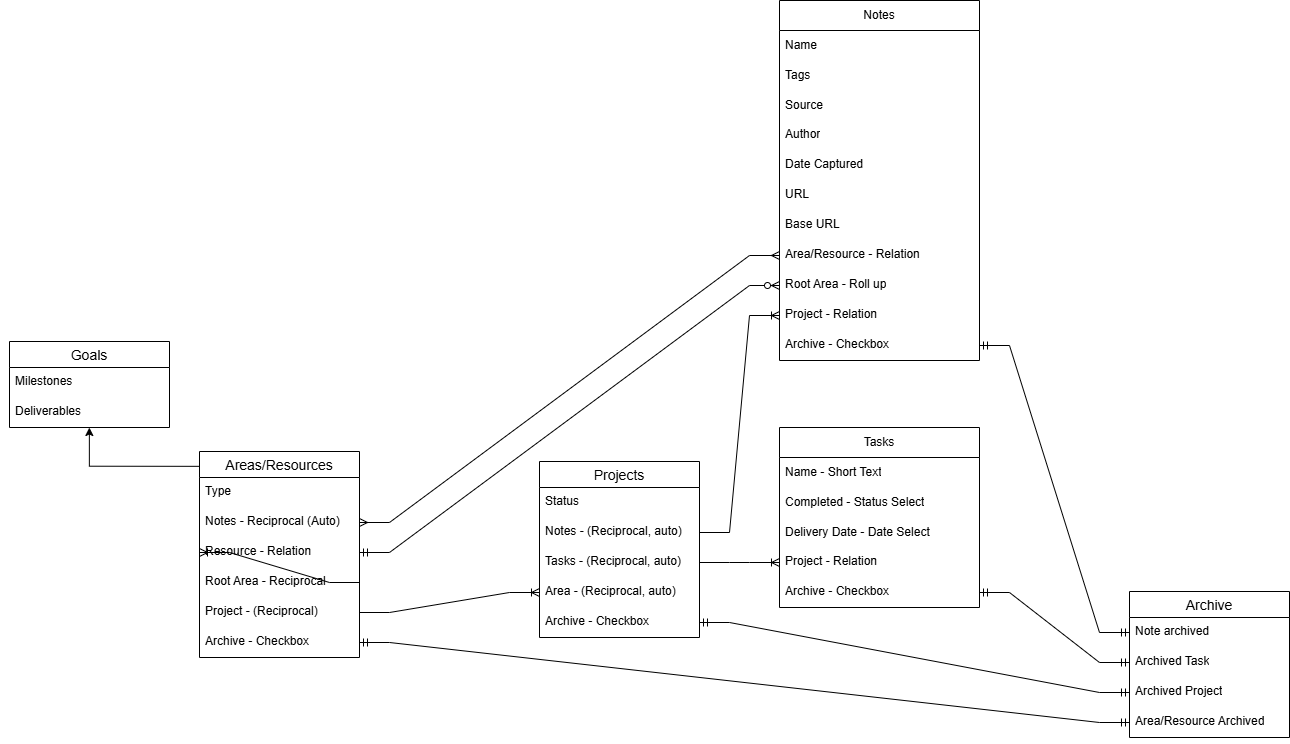
There are attributes to each piece of information. This is the information listed in the blocks. Then there are links to other information, reciprocally. A note can be related to a Project. Then the Project will know that the Note is associated with it - those are the lines. This diagram is an Entity Relationship Diagram, and is the base through which we can draw information safely situated into many dashboards, with many relations generating a context.
Signing off
Given that the information we will be working with is very intricate, and given that a project context makes the use of the information so dynamic, the magnitude of the endeavour has sky-rocketed. But I am determined. We shall swim and not sink.
Please share this post with some Mechanical Engineer in your life. If they are in a position where they apply their minds in project form, this might be the start of the solution that sky-rockets their effectiveness.
Hannalie

Hannalie Vergotine
A work of intrinsic worth